
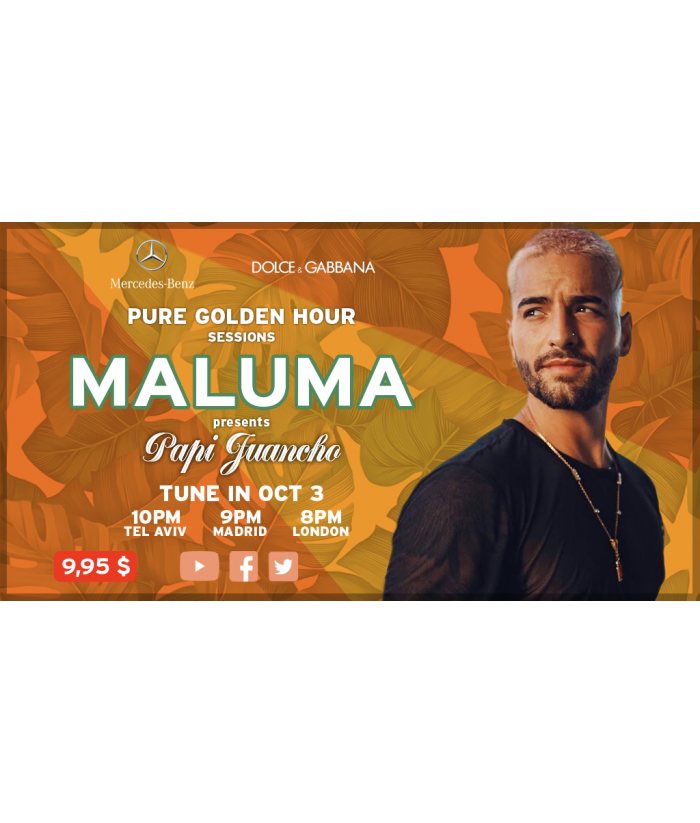
Since I cannot be close to my fans due to the situation we are experiencing, I am going to present my new album internationally through 3 performances adapted to the “prime” times of the American, European and Asian continents on October 2, 3 and 4.
Sign up, there will be a great atmosphere, lots of music, interaction with fans and surprises.
To those of you who can come to the Miami Arena to attend the concerts live, always respecting the sanitary measures, I wait for you so that we can all throw a party.
I am going to do a virtual tour to present my new album, “Papi Juancho”, live on October 2, 3 and 4 from Miami.
Get your access now so you can be with me on this tour from your country, on the 2nd if you are in America, on the 3rd from Europe and on the 4th from Asia. We do it like this so that you can connect in the evening hours from your country, and so you can share with me these special moments with good music, march, interactions and much more.
The different events will have various surprises, giveaways and prizes along with lots of interactivity. A unique experience for the privileged who wish to attend from home.
All you have to do to attend the event is register when you buy your ticket. For this you will need an email account (email) and create a security key (password). When you go to access the day of the event, use the same username (your email account – email) and your security code – password), and you will have immediate access.
As the user is your email account, if you want to buy a gift ticket for example, for a family member or friend, you will need to create a new user. In this case, enter your email account (email) and a security key (password) so that your entry will reach him directly. And do not forget to communicate your security key (password) so that the day of the event you can access it.
Our recommendation is that on the day of the event, you access it with a short notice (10-15 minutes) to avoid possible saturation during access. When you have signed in, don’t worry if the content you are viewing still does not play any video. This is normal. Until the event begins, a video with a countdown will be shown as normally happens with any live event. Livestreaming is reproduced simultaneously in all countries of the world, and therefore and unlike your online content platform (Netflix, HBO, Amazon Prime, Apple TV …) it is not on demand. In this case we are attending a live event (as if you were at the Theater) that begins and ends at a specific time.
Important and not to wait until the last minute: we have enabled a small test video on the event page:
In this way you can do a test before buying your ticket, and you can confirm with the device you usually use to access content (Smartphone, Tablet, PC or TV) that it is correctly displayed.
This test video plays in the same MediaPlayer that will be used during the event. Although almost all the MediaPlayer with which to view this type of content are compatible with most browsers on the market, there are still some incompatibilities for certain devices. Make sure before buying that you do not have this incompatibility. If this happens to you, try another browser (safari, chrome, Firefox, etc …). Even so, if for any reason you do not connect to the live show, you will have the possibility to do it “on demand” up to 48 hours after the end of it. Your access data will allow you to access until then.
To watch the event on your television you can do it in the following ways: If you have a Smart TV: loading the same page of the event in your browser, and accessing with your username and password. Do not forget to check beforehand that you can view this content without problem on your Smart TV before purchasing tickets.
If you don’t have Smart TV: you can connect your TV to your computer through an HDMI cable and receive the content from it. Check that this formula works for you. If not, you should see it through your Smartphone, Tablet or Computer.
Si puedes visualizar el video de prueba no tendrás ningún problema el día del evento utilizando el mismo dispositivo. Si el día del evento utilizas otro dispositivo que no hayas comprobado previamente y no puedes acceder, inténtalo con otro navegador. Nuestra recomendación es que este ejercicio lo hagas ya, antes de comprar las entradas. Si aun así tuvieras problemas de acceso, te ayudamos. Escríbenos a soporte@smartevents.app y contactaremos contigo. Recuerda que, como ocurre con el contenido que normalmente descargas a diario, es imprescindible tener acceso a internet durante el evento.
Yes, the event can be viewed from anywhere in the world. What you have to take into account is your time slot. If you want to check the starting time in your locality, click on the following link, and enter Miami (US Florida) in “first place” and the city in which you are in “second place”. The event will start in Miami depending on the day you buy the ticket according to the following times:
October 2: 10 pm (night time suitable for the American public who will enjoy the event at night).
October 3: 3 pm (Miami afternoon schedule suitable for European audiences who will enjoy it at night).
October 4: 9 am (Miami morning time suitable for Asian audiences who will enjoy it at night).
If you buy a ticket for example, for October 4 and your location is at +12 hours for example (Beijing) this means that if the event starts at 9 am in Miami, the event will start in Beijing at 9 pm October 4, 2020. Click on the following link and check the starting time in your area. Hora de comienzo
Even so, and in the areas of maximum expected attendance, these would be the hours:
October 2nd
10 pm (22: 00h) Miami
9 pm (21: 00h) Medellín
8 pm (20: 00h) Los Angeles
October 3
10 pm (22:00h) Tel Aviv
9 pm (21:00h) Madrid
8 pm (20:00h) London
4th of October
10 pm (22:00h) Tokio
9 pm (21:00h) Pekín
6:30 pm (18:30h) Delhi
Yes! All the confidential data that we handle is sent via SSL.
This is not indicated as a site-wide HTTPS usage, as it is not; they are purely calls that need to be made over HTTPS, such as private user data or payment information.
Site security is visible using any website inspection tool.
The CVV (“Card Verification Value”) number is the 3-digit number located on the back of your VISA®, MasterCard® and Discover® credit or debit card. On an American Express® credit or debit card, it is a 4-digit code number.
Since I cannot be close to my fans due to the situation we are experiencing, I am going to present my new album internationally through 3 performances adapted to the “prime” times of the American, European and Asian continents on October 2, 3 and 4.
Sign up, there will be a great atmosphere, lots of music, interaction with fans and surprises.
To those of you who can come to the Miami Arena to attend the concerts live, always respecting the sanitary measures, I wait for you so that we can all throw a party.